DFI Day 3 2026

Kia Ora 

Today, yet again I was reminded about things I knew but also added some more details to what I already knew. Today’s main idea from Dorothy was “It’s all about the hook that will get the students engaged in their learning. The more engaging, the more learning they will do.” 

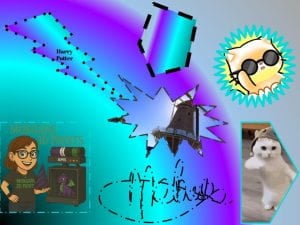
Explore google draw. This google piece I am very used to but today I learned about gradients which I have never heard of or looked at before. This was exciting to learn about.

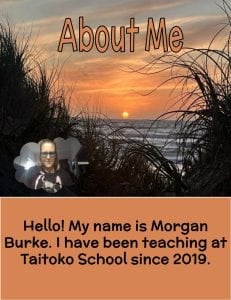
Another aspect of google draw I learned was how to use the same colours as the pictures you have chosen. This was really nice to know about. With the About Me google draw I enjoyed having the same orange colour as the background. 

The last idea I looked at was google slides. I have done animations before but today I learned how to make the page a different size as you can see below. This was cool to know about. The line “death by slides” spoke to me, so why not make the sizes different. 

All of these tips and tricks I will be adding to my kete of knowledge as I already do these things in the classroom. To add these extra details will make the students stand out more. I have some of the same students as last year so it will be great to level them up as I have been levelled up. 

Until next time!
DFI Day 2 2026

Kia Ora

Today I have increased my understanding of Manaiakalani Kaupapa and pedagogy by knowing more about the RAT acronym. Recognise effective practise, amplify teaching and turbocharge teaching. The website “curriculumdesign.nz” is an incredible resource to use and I look forward to diving into it. 

“If it is worth teaching, it’s worth capturing,” is a quote I highly enjoyed today. 

For my workflow, getting google keep to work better for me is going to be an amazing thing. Making things connect and being able to find things easily is going to be a huge thing for me. I lose things easily and if I have one place to have things like google keep, I feel this is going to be a good thing for me. 

My gmail. I know I am slack with filing and having my inbox full of emails. Today I have learned where the unsubscribe tool is  and how to archive emails in a fast, easy way. I started with 8000 emails. I am down to 2000 emails to put into the right places. This I feel will be an incredible start to the year. And learning how to keep things clean and tidy. 

Split view on my browser with the right click, add tab to new split screen is going to be a lifesaver. I was previously pulling things apart to make a split screen. This way stays in the browser which is going to be much better! 

With my learners, I will be able to show them how to unsubscribe. I know some of my students are on Pinterest and get daily emails. I will show them how to change this. 

Also with my learners, knowing the “control, shift, T” is going to be a good thing to use. I liked how Stacey explained how to use it in the classroom. 

Grouping bookmarks, pin tabs, tasks, google keep, archiving, filing and all of these workflow things are what I will try to use this year to keep things organized and look appealing and trying to stay organized for the year. 

This I know will be a challenge.

On a side note, making the video was fun, getting the video was easy, but, somehow my google drive did not make the folder for the video to go into. This was very strange! 

Here is my video from playing round with google meets! Enjoy.

DFI Day 1 2026

Kia Ora! 

Today I learned more about the Manaiakalani Kaupapa. I learned that Manaiakalani has been around for a number of years. It started in 2006 with Bebo! I remember using Bebo as a kid and it feels like it has come round as a full circle now. It is really cool to see how technology has come and what platforms people have used in the past. Realising that a device is not replacing the book but it is replacing the pencil was a different kind of way of thinking of it. It is a tool for learning and another way of presenting and receiving content. 

Making sure there is hope for the community and talking to the community about their needs part of the Kaupapa of Manaiakalani. Which is the same reason why Google was chosen since it is good way to collab and it is free. 

There are a number of things I learned / revisited this time round. Reminding myself to folder documents properly and label them properly too. Reminding myself to do this with the akonga from the start of the year and not bringing it in throughout the year like I  have in the past. But not in the last few years. There are a number of new things such as the parent folders and limit access folder. This was some new ideas which I didnt know before and I am glad that I do now so am able to help myself more through these ideas. 

Complete new learning for me has been the document tabs and how they work. I will endevour to use these more and teach my students how to use them. Smart clips was another new thing that came up for me especially translation. 

With having a big class and all needing to voice type, finding out about different ways to manage this has been a highlight for me. In the past I taught students how to use their hands. Today it was meantioned about coffee cups. I feel this is a better idea so will be looking into how to do that in the next term.     

Things I can use with my learners is using google docs for creative tasks. Usually I use slides or draw. Today reminded me to use docs and how to use it and decorate it. 

In my personal life I was reminded how to book mark, make folders, being in the right profile, personal vs professional, and making use of the smart chips.

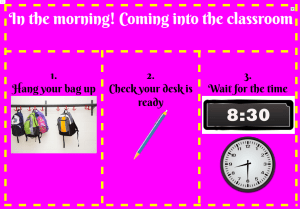
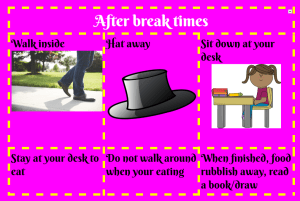
With create today, I made some posters I will be using in the classroom in the coming year. The culutre/langauge poster I still need to finish but the other two are done. I am super excited for how different and pretty they look.


Term 2 Week 5

Kia Ora


So many things have happened tech wise recently it has been hard to keep up.

One of the teachers is doing DFI currently and she is asking lots of questions that I am able to help and support her with which is brilliant. Her main question this week was, where is a central place to put students work? Then it was Google Sites week so she found out that way. I have told her I can show her my previous site to help her navigate her way round sites. She asked about how to keep students safe online when sharing site and other documents like that. I explained about changing the restrictions to only Taitoko School emails. She was happy that there was an option for that to happen as she was rather worried about privacy for our students and for herself.

We are currently working on ShowQuest and have been making a background video for the dance. This has pushed me out of my elements for what I know. I had to do a lot of research to make a video that was perfect for our show. There was lots of learning for myself involved but now I have learned how to use these new apps I feel it will be easy to teach the class how to make their own videos. In class we are working on report writing. I would love to see each student create a video about their chosen space topic.

At the beginning of the term we were working on ANZAC silloetes. Students had to use a picture from google search. Then get a picture of a soilder. Remove the background and insert it into the picture. We ended up having a soilder with a background of the sunset / sunrise. it was like our soldiers going off to war at the beach of anzac cove.

Questions that I have been asking myself:

How do we stay connected to our community? How does this help with attendance?


How can I help all staff in the school?


What is the next step in teaching for the teachers?


What would the next step for teacher aids be? – Maybe ask for time with them during class to support with the computers in the moment

Week 2 Term 2

What have I been doing for WST?

I have been supporting teachers with their DFI and if they have any questions for technology I am able to answer ad support teachers where needed.

For Showquest, the set is digital. Through using my Manaiakalani DFI knowledge I have started to create the digital set. I have been keeping in mind about the use of coms free images and how to create your own images through draw.

Inside the classroom, we have been using google draw to create ANZAC images. The skills used for this are transferable from one activity to another. Inserting images (coms free), remove b.g., partial screenshot with the device, and filing.

In the office, I have been asked to provide a digital screen for the office TV for families who come in. I am working on making a slide show that is able to be edited frequently.

I have noticed that office staff and teacher aides need to be unskilled in certain areas of the digital world. Next step here is to see if I can run a workshop for these people to find out their next steps.

Week 7 Update

Over the last few week, a lot of tech things have been happening. It has made me so excited to say that things are going well.

I have made more posters to explain how to look after the devices.

Since screencastify have changed their rules and settings, I set out to look for another way to record the screen. Turns out on a windows device windows + alt + r, lets you record your screen and if you click the microphone lets you record your voice too. It saves on your device too. This made me super happy since now I do not need to use screencastify. 

With the students a lot of work has been done. Taught them how to use Kami and they sent me their Kami uploads folder so now we can edit PDFs through Hapara and I always have access.

This week, the middle/senior team had a swap. One group went swimming, one went to sport and I had a few students for tech work. Since I had already loaded Hapara with Pixel Art, all I had to do was drag the other classes on for them to watch the videos to do the art. This I felt worked really well since the students were able to work in their own time, at their own page. A lot managed to get it done and finish the same day too.


2023 Week 2 Term 1

This year has gone off with a hit with my new class! Started with new ideas.

For my new class we have started with getting to know one another with about me pictures on slides.

I have created a class newsletter using canva.

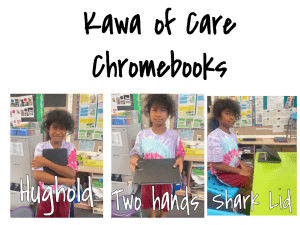
For the school, I have created a Kawa of Care poster with my students demonstrating how to use devices and with new terms to use. Next step here is to train the staff in the terms to use to gain student attention.

For the school, we are pushing Facebook more than before. We are trying to make our school more visible for our whanau. We are posting more often with more things. Putting notices up and reminders. with celebrating what our school has been doing and what it looks like daily

With the Facebook page, we have also created a shared messenger page. anyone can take photos and post them so we are able to see different aspects of the school, not just through one lens.

https://www.facebook.com/taitokoschool

For the school, I have made email addresses and passwords for the students more accessible. We have a google sheets with all emails and passwords in it. when it is updated I send a reminder email to that teacher to let them know to check.

For the school, I have created an admin calendar and set up the calendar for the staff.

DFI. External Recognition 9

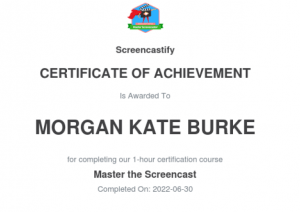
What a day this was! Have been freaking out for most of the week. Stayed up studying last night for it too, but in the end, it all worked out and I passed. Also went on to do the Screen Castify Certified as well. So from today I now will have 3 badges! That makes me super excited and super happy!

In the future, I think I will use this blog to note down my professional developments. . Last year my inquiry was “How can digital technologies help improve writing ability.” Through this course, I have been able to add to the answer to this and continue learning for my own personal benefit.  I feel keeping the blog up will aid and support that process. I have had an amazing journey

I feel this course has been exactly what I have been looking for and I am glad I got the opportunity to be a part of this. Manaiakalani is the online world dream and making life easier rather than harder is what I am all about. I am happy that I have found other educators from around the country to share and learn from. Also along the way I have collected lots of resources which has already been of use inside the classroom and with other teachers. I have more confidence in myself and to teach students and other colleagues my newfound knowledge.

Every week I came one step closer to achieving my goal of being the best tech person I could be.


I look forward to over the next few weeks, going over the list of other things to be certified in such as; Book Creator, WeVideo, Kami, and Google Cert Level 2. When completed I know I will be able to share it on this blog.

This course has changed my life for the better. Using calendar more effectively. Managing my drive better. If I want to change anything through google, I know how to and I know what options are available to me. Work-life is more effective. Personal life is smooth now. Adding things to the calendar and having my phone always on me has been a huge thing! Now I know where I am meant to be and when. No more doubling ups or forgetting things. Even went one step further and got myself a Google Assistant. In the mornings my assistant reads out to me my calendar. I have noticed this has helped me be better prepared for the day and I am not constantly looking at a notebook or forgetting to read the notes. Same with using Google Keep. Can type the notes through my phone and they are also visible on my computer.  My brain is now calm and at peace. I do not feel overloaded anymore. This is a great improvement compared to the start of the year.

DFI Computational Thinking 8

The greatest joy comes from empowering students to be creative and have fun with their learning, 

  • What did I learn that increased my understanding of Manaiakalani kaupapa and pedagogy?

Empowerment is the key that I love to work with. Students need to feel empowered to get them to continue working and make students think of the joy of performing. Being able to give students the tools and resources that are transferable. Not just inside a school context but in a worldly context. Making connections to how the students can use these new tools in the classroom but also in their own lives.

The future is here compared to the past of the 90s but at the same time, we are in the past compared to the future. As it was said jobs that are available now were not available 10 years ago so what jobs are not here now that will be here in 10 years’ time? This concept baffles me since it’s such a futuristic concept.

  • What did I learn that could improve my confidence, capability or workflow as a professional?

I need to learn how to be more creative through coding. My students have been asking me for Minecraft so my next learning journey in my own time will be to find out how this works and start it in my classroom. On the positive side tho I learned about scratch today (see below) so this could be an area to start on first. My scratch below is very basic but I am proud that I was able to make a start and do that within an hour. Another thing for me to play around with and work on in my own time.

  • What did I learn that could be used with my learners?  

Scratch! is the main thing but looking into all the other coding activities and the unplugged activities are going to be great resources to use and share with others at my site.

  • What did I learn that could improve my confidence, capability or workflow in my personal life?

Being more empowered within the coding realm. Using this for my own benefit and for my own enjoyment. Having fun with things and having the confidence to be able to use it.

DFI. Devices 7

What did I learn that increased my understanding of Manaiakalani kaupapa and pedagogy? Dorothy talked about removing barriers today. This is what I have been working on with my class. One of my students is dyslexia so been removing barriers for this student for him to do his writing through voice typing rather. 

Everything Dorothy talked about today is everything I am about with rewindable content, pace, subtitles, and learning from anyone.

What did I learn that could improve my confidence, capability or workflow as a professional? I learned about how to use ipads more and how to use the chromes more. I have never had a chance to use either of these learning devices before and to have a chance today showed me the struggles some of my students go through since I was having the same troubles! Knowing about keyboard shortcuts that my students scream out all the time, helped me now to know what’s actually going on in my class. It’s like a code and a secret language I have just learned so this has definitely improved my confidence in my class. 

Below is my attempt of using Explore Everything on the iPad. I have never had a change to use ipads in my classroom setting so using it today was an experience. I do not feel confident with it but I feel familiar with it. This for me is a good step and its another area of learning I could/should consider.


What did I learn that could be used with my learners?  I would use the keyboard shortcuts to make things easier. Through this digital dig we did today I learned about Chromes. I usually use a portable mouse but decided not to with the chrome today since most of my learners do not have them. I fully understand their struggles now with creating and answering the questions inside this digital dig. Next step could be to give my students this digital dig to see where they are all at or just for practise. 


What did I learn that could improve my confidence, capability or workflow in my personal life? Doing the creative today in Hapara today taught me about being cyber smart with our digital footprint. This had opened my mind up to how to stay smart when it comes to the internet. I have noticed in myself that when my Facebook memories come up of 5-10 years ago ho bad some of the photos or comments were – no matter how many times I deleted or blocked it back then. If I knew then, what I know about being cyber smart I would never have posted those sorts of things. Now as an adult, I see things more clearly and understand how things work better.